
Rich Push Notifications
Android
- Push notification icon - The plugin looks for a drawable named
ic_stat_vibes_notif_icon.pngin the resources section of your project, and uses that to display an icon when push is received. - Sound - The plugin looks for sound files in
rawfolder of the Android resources, and plays them when instructed to do so based on the payload contained in the notification. Note that sound will only play if you pass along a Notification Channel in the push payload else the default VIBES notification channel will be used, which doesn't play sound.
Refer to the sample app included in the sample-app folder in this project to see how these 2 are configured.
Further documentation on customizing the notification icon, notification channels, sound, displaying images in notification and other extras can be found in the Android SDK documentation here
Adding Rich Push for iOS
To Add Rich Push to iOS, you need to add a Service Extenstion to the project. The service extension sits between the APNS server and the final content of the push and gets a limited execution time to perform some logic on the incoming push payload. This allows you to intercept the push content coming in from the APNS, modify it and then deliver the modified payload to the user.
Steps to add:
-
Go to the iOS project under
<your_rn_project>/iosand open the.xcworkspaceon XCode. -
On XCode create a new target by clicking
File ▸ New ▸ Target…. -
Filter for the
Notification ServiceExtension and click Next: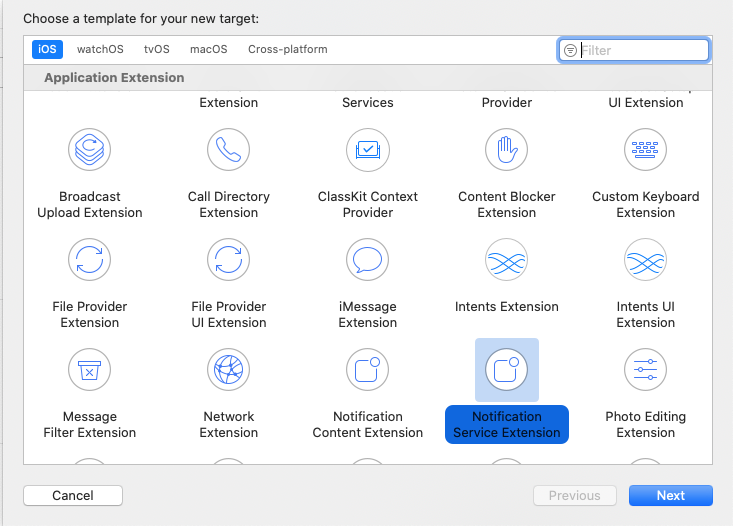
-
Give it a name say
RichPush, select Team, Bundle ID and language to use (you mostly want to stick with Swift here) and should be set toEmbeded in Application(this is your main application project).Then click Finish. -
If you wish to expose some of the helper classes to the new services extension you created, select the file you wish to expose, go to
File Inspectorand add a check to your service extension target.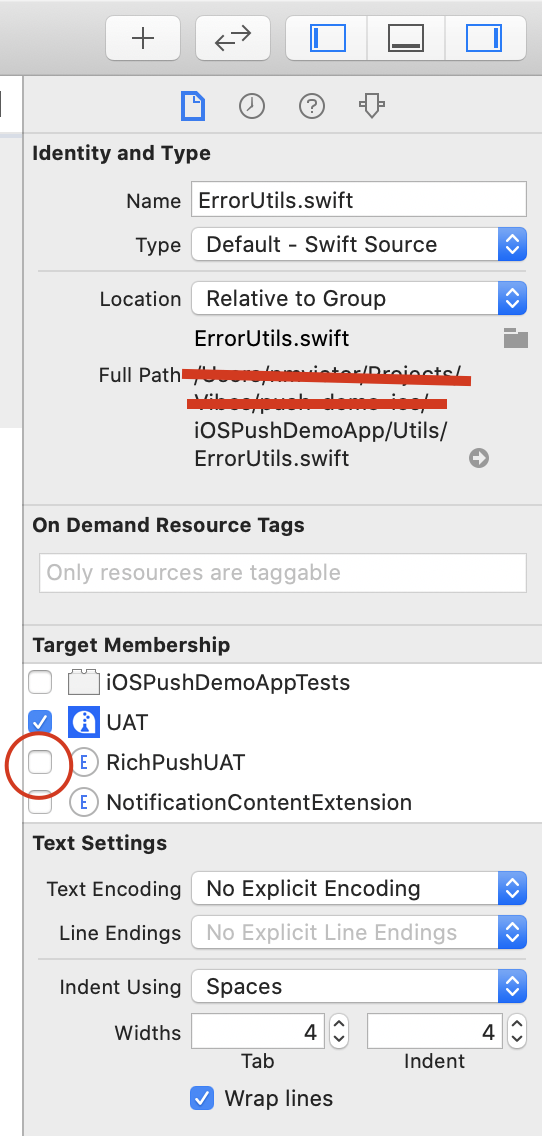
-
Next go to your Apple Developer Page and create a
Siging Certificate and Provisioning Profilefor theBundle IDyou selected above. Make sure these are selected underSigning & Capabilitiestab on your XCode project setting. You may also just useAutomatic Signingif this suits your needs.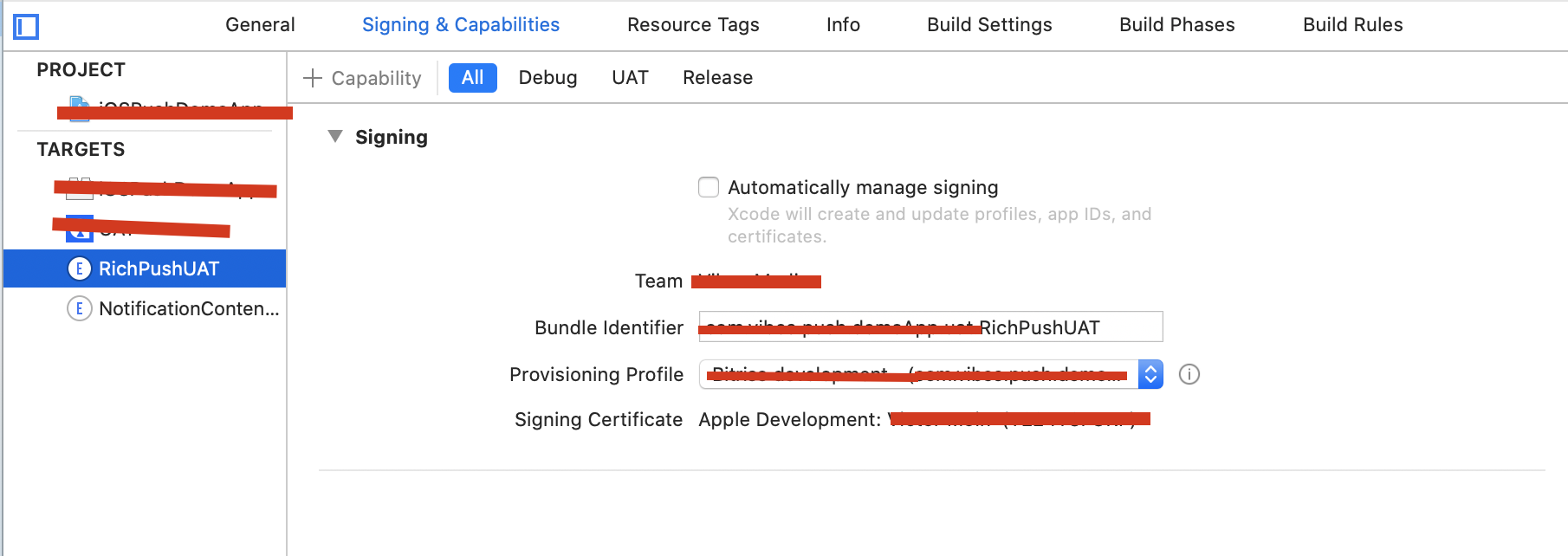
-
You new RichPush target will have a
NotificationService.swiftfile created wich should allow you to intercept and modify the notification.
import UserNotifications
import MobileCoreServices

@available(iOS 10.0, *)
class NotificationService: UNNotificationServiceExtension {
 let parse = RichPushNotificationParsing()

 override func didReceive(_ request: UNNotificationRequest, withContentHandler contentHandler: @escaping (UNNotificationContent) -> Void) {
     // you may add your notification Parser here e.g to intercept and maybe dowload a media as in our case
   parse.didReceive(request, withContentHandler: contentHandler)
 }

 override func serviceExtensionTimeWillExpire() {
   parse.serviceExtensionTimeWillExpire()
 }
}- This is how the notification Parser may loook like if you are looking to download image with url specified in
client_app_datausing the keymedia_urlwhen posted from the Campaign Manager.
import UIKit
import UserNotifications

class RichPushNotificationParsing: NSObject {
    var contentHandler: ((UNNotificationContent) -> Void)?
    var bestAttemptContent: UNMutableNotificationContent?
    fileprivate let kClientDataKey = "client_app_data"
    fileprivate let kMediaUrlKey = "media_url"
    fileprivate let kRichContentIdentifier = "richContent"

    func didReceive(_ request: UNNotificationRequest, withContentHandler contentHandler: @escaping (UNNotificationContent) -> Void) {
        self.contentHandler = contentHandler
        bestAttemptContent = (request.content.mutableCopy() as? UNMutableNotificationContent)

        if let bestAttemptContent = bestAttemptContent {
            if let clientData = bestAttemptContent.userInfo[kClientDataKey] as? [String: Any] {

                guard let attachmentString = clientData[kMediaUrlKey] as? String else {
                    return
                }

                if let attachmentUrl = URL(string: attachmentString) {
                    let session = URLSession(configuration: URLSessionConfiguration.default)
                    let attachmentDownloadTask = session.downloadTask(with: attachmentUrl, completionHandler: { (location, response, error) in
                        if let location = location {
                            let tmpDirectory = NSTemporaryDirectory()
                            let tmpFile = "file://".appending(tmpDirectory).appending(attachmentUrl.lastPathComponent)
                            let tmpUrl = URL(string: tmpFile)!
                            do {
                                try FileManager.default.moveItem(at: location, to: tmpUrl)
                                if let attachment = try? UNNotificationAttachment(identifier: self.kRichContentIdentifier, url: tmpUrl) {
                                    self.bestAttemptContent?.attachments = [attachment]
                                }
                            } catch {
                                print("An exception was caught while downloading the rich content!")
                            }
                        }
                        // Serve the notification content
                        self.contentHandler!(self.bestAttemptContent!)
                    })
                    attachmentDownloadTask.resume()
                }
            }
        }
    }

    func serviceExtensionTimeWillExpire() {
        // Called just before the extension will be terminated by the system.
        // Use this as an opportunity to deliver your "best attempt" at modified content, otherwise the original push payload will be used.
        if let contentHandler = contentHandler, let bestAttemptContent =  bestAttemptContent {
            contentHandler(bestAttemptContent)
        }
    }
}- Compile and Build your project to a device capable of receiving Push notifications on the APNs certificate used for your application project.
- You should end up with Rich Push notification, when you send a broadcast that has a media attachment from the Campaign Manager.
More information about setting up your iOS app for Rich Push notifications can be found here
Updated 6 months ago